Learn how to integrate Stubby CMS with Next.js to create a dynamic blog with revalidation capabilities, ensuring your content is always up to date. Follow this step-by-step guide to set up your project, configure Tailwind CSS, fetch and display content, and enhance SEO.
1. Setting Up Next.js with Tailwind CSS
- Create a new Next.js project — Start by creating a Next.js application using the official CLI:
npx create-next-app@latestDuring setup, select the following options:
Need to install the following packages:
create-next-app@15.1.4
Ok to proceed? (y) y

✔ What is your project named? … —— stubby-blog
✔ Would you like to use TypeScript? … —— Yes
✔ Would you like to use ESLint? … —— Yes
✔ Would you like to use Tailwind CSS? … —— Yes // [!code highlight:2]
✔ Would you like your code inside a `src/` directory? … —— No
✔ Would you like to use App Router? (recommended) … —— Yes
✔ Would you like to use Turbopack for `next dev`? … —— Yes
✔ Would you like to customize the import alias (`@/*` by default)? … —— No- Install Tailwind Typography — Tailwind CSS is pre-configured, but we will extend it for better styling of rendered markdown. Install the
@tailwindcss/typographyplugin:
npm install -D @tailwindcss/typography- Install additional dependencies — Install the required packages to enhance your content with custom components such as code highlighting, image zoom, tabs, callouts, and steps.
npm install @stubby-cms/ui shiki @shikijs/transformers react-medium-image-zoom tailwind-variants- Configure Tailwind CSS — Update your
tailwind.config.tsfile to include Stubby CMS UI components and the typography plugin:
import type { Config } from "tailwindcss";

export default {
  content: [
    "./pages/**/*.{js,ts,jsx,tsx,mdx}",
    "./components/**/*.{js,ts,jsx,tsx,mdx}",
    "./app/**/*.{js,ts,jsx,tsx,mdx}",
    "./node_modules/@stubby-cms/**/*.{js,jsx,ts,tsx}",
  ],
  theme: {
    extend: {
      colors: {
        background: "var(--background)",
        foreground: "var(--foreground)",
      },
    },
  },
  plugins: [
    require('@tailwindcss/typography'), // [!code highlight:1]
  ],
} satisfies Config;- Run the Development Server — Start your project with the following commands:
cd stubby-blog
npm run dev
2. Environment Variables
Add your Stubby CMS credentials to a .env file at the root of your project:
STUBBY_API_KEY="your_stubby_api_key"
STUBBY_SITE_ID="your_site_id"
STUBBY_BASE_URL="https://stubby.io/api/v1"
You can find these values in your Stubby CMS site settings.
3. Building the Blog List Page
Create a file named app/blog/page.tsx to serve as your blog's entry point. This page fetches and displays a list of blog posts.
import Link from "next/link";
// Fetch data from the server
const getData = async () => {
const siteId = process.env.STUBBY_SITE_ID;
const url = new URL(`https://stubby.io/api/v1/sites/${siteId}/collections`);
url.searchParams.append("apiKey", process.env.STUBBY_API_KEY!);
const res = await fetch(url.href, {
cache: "force-cache",
next: { tags: ["posts"] },
});
const data = await res.json();
return data;
};
const BlogListPage = async () => {
const data = await getData();
return (
<main className="container mx-auto max-w-4xl pb-40 pt-16">
<h1 className="font-semibold text-3xl mb-3">Blog</h1>
<ul className="list-none p-0 gap-10 flex flex-col">
{data.map((blog: any) => {
return (
<li key={blog.metadata.slug}>
<Link
href={`/blog/${blog.metadata.slug}`}
className="text-xl font-medium"
>
{blog.title}
</Link>
<p className="text-gray-500">{blog.metadata.description}</p>
<Link href={`/blog/${blog.metadata.slug}`}>Read more →</Link>
</li>
);
})}
</ul>
</main>
);
};
export default BlogListPage;4. Creating Individual Blog Pages
- Set up content components — Create a file named
components/content-components.tsfor reusable content components:
export {
  Note,
  Tip,
  Info,
  Warning,
  Step,
  Steps,
  Tabs,
  AccordionGroup,
  Accordion,
  Card,
  CardGroup,
  PreBlock as pre,
  ImageZoom as img,
} from "@stubby-cms/ui";- Install markdown libraries — In this guide, we use the
markdown-to-jsxlibrary to render MDX to JSX. Alternatively, you could usenext-mdx-remoteor@mdx-js/loader.
npm install markdown-to-jsx- Fetch and render blog content — Create a file at
app/blog/[slug]/page.tsxto render individual blog posts:
import Markdown from "markdown-to-jsx";
import * as components from "@/app/components/content-components";
import { notFound } from "next/navigation";
import Link from "next/link";

const getData = async (slug: string) => {
  const siteId = process.env.STUBBY_SITE_ID;
  const url = new URL(`https://stubby.io/api/v1/sites/${siteId}/pages/${slug}`);
  url.searchParams.append("apiKey", process.env.STUBBY_API_KEY!);
  try {
    const res = await fetch(url.href, {
      next: { tags: [slug] },
    });
    const data = await res.json();
    return data;
  } catch (e) {
    return null;
  }
};

const BlogView = async ({ params }: any) => {
  const { slug } = params;
  const data = await getData(slug);
  if (!data) {
    notFound();
  }

  return (
    <div className="container mx-auto max-w-4xl pb-40 pt-16">
      <div className="max-w-prose mx-auto flex flex-col gap-4">
        <Link href="/blog" className="font-semibold uppercase no-underline">
          ◀︎ Back to blog
        </Link>
        <h1 className="text-3xl font-semibold">{data.title}</h1>
      </div>
      <article className="prose mx-auto mt-8">
        <Markdown options={{ overrides: components }}>{data.content}</Markdown>
      </article>
    </div>
  );
};

export default BlogView;
5. Enabling Content Revalidation
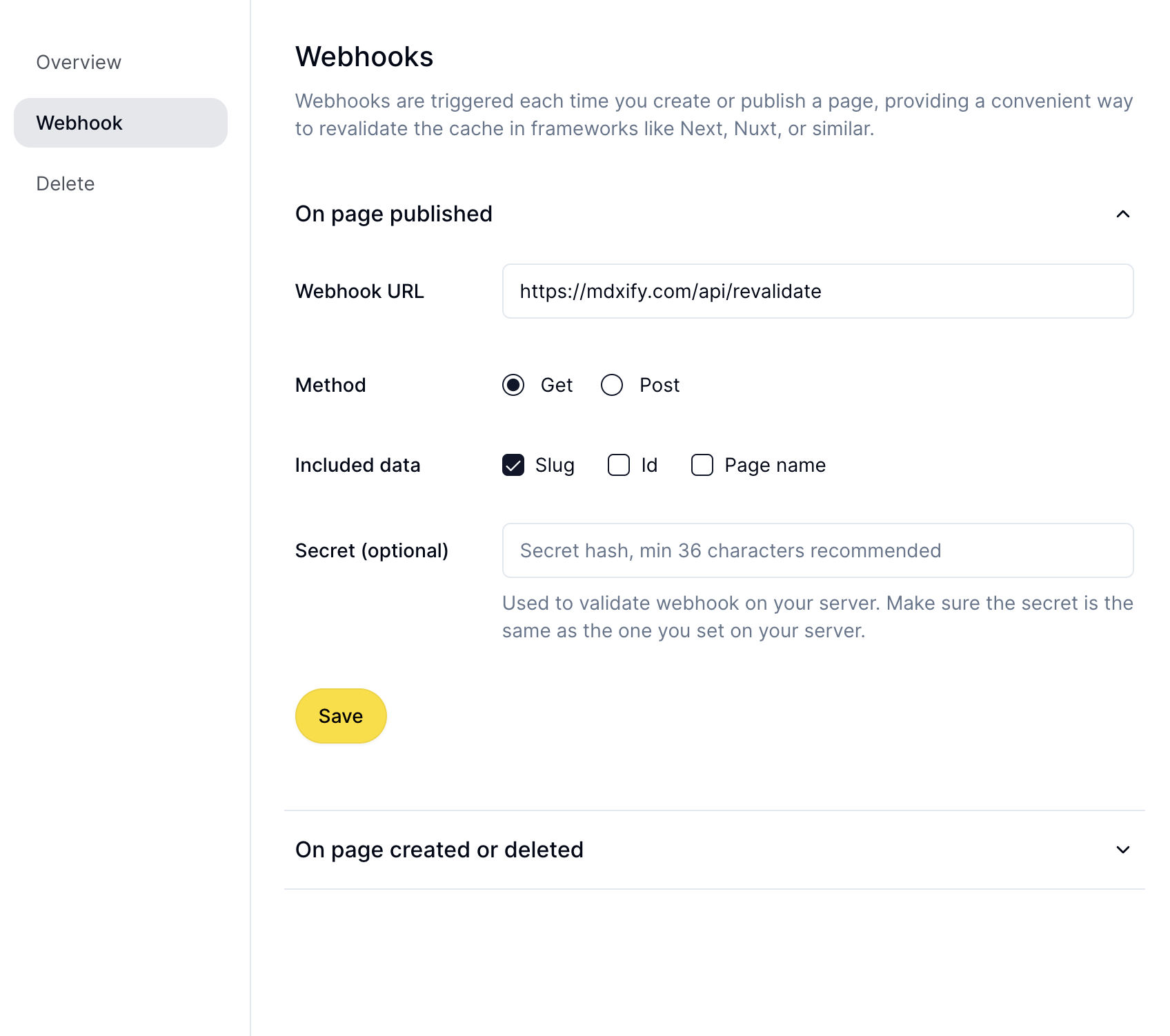
To ensure your blog reflects the latest content, set up a webhook for revalidation. Create a file at app/api/revalidate/route.ts:
import { NextRequest, NextResponse } from "next/server";
import { revalidateTag } from "next/cache";

export async function GET(request: NextRequest) {
  const tag = request.nextUrl.searchParams.get("tag");
  const slug = request.nextUrl.searchParams.get("slug");
  if (tag || slug) {
    if (tag) revalidateTag(tag);
    if (slug) revalidateTag(slug);

    return NextResponse.json({ revalidated: true, now: Date.now() });
  } else {
    return NextResponse.json(
      { revalidated: false, now: Date.now() },
      { status: 400 },
    );
  }
}
Configure this endpoint in Stubby CMS under Settings > Webhooks to trigger revalidation automatically on content updates.
6. Enhancing SEO and Open Graph Support
Leverage MDX frontmatter for SEO and Open Graph metadata. Add relevant data like titles, descriptions, and images to improve search engine performance and social media previews.
7. Conclusion
By integrating Stubby CMS with Next.js, you gain a powerful, flexible setup for managing dynamic content. With revalidation, custom content components, and optimized rendering, your blog is not only performant but also easy to maintain. Try Stubby CMS today to supercharge your Next.js applications!